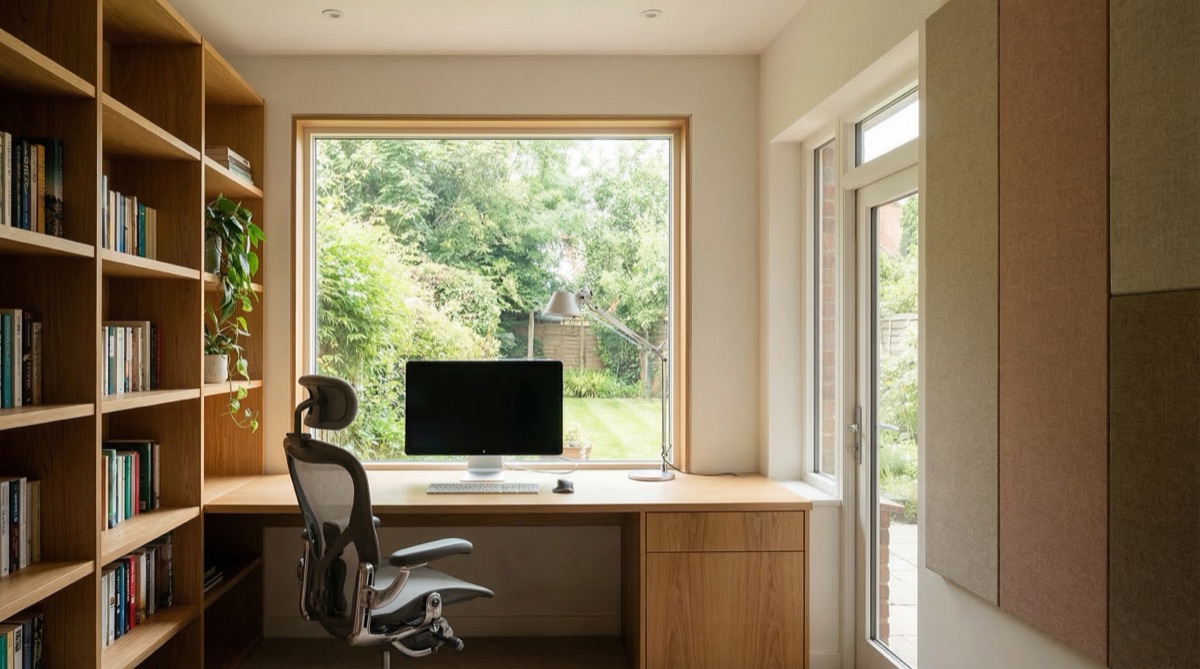
Home Office Extensions: Creating Your Perfect Work-from-Home Space
Design a dedicated home office extension. Learn about ergonomic layouts, lighting, acoustics, and creating a productive, professional workspace at home.
Creating the Perfect Home Office Extension
Since the pandemic, remote working has become mainstream for many professions. A dedicated home office extension provides space for focused work, professional video meetings, and clear separation between home and work life. Well-designed home office extensions increase productivity, improve work-life balance, and enhance property value. This comprehensive guide explores how to design and build a home office extension that creates an optimal working environment while maintaining professional appearance and comfort.
Home Office Extension Design Basics
A functional home office extension typically requires 12-16 square metres, providing space for a desk, storage, seating for guests, and some flexibility. Optimal layouts avoid clutter while accommodating necessary equipment. Design considerations include: natural light for wellbeing and circadian rhythm support, acoustic control limiting external noise and work-related noise affecting others in the house, thermal comfort with independent temperature control, professional appearance for video meetings, and storage for office equipment and paperwork.
Ergonomic Layout and Furniture
Desk Positioning: Position desks to face away from windows (preventing glare on screens) while having windows within side view (providing light without glare). Avoid positioning desks with windows directly behind (creating backlighting in video calls) or facing walls (creating sense of constraint). Allow desk depth of at least 800mm for computer equipment and working space. Desk height of 700-750mm suits most people — adjustable-height desks accommodate different users and support standing-desk usage promoting better circulation and reducing sedentary time.
Chair Selection: A good office chair is essential for 8+ hours daily sitting. Invest in ergonomic seating with lumbar support, adjustable height and armrests, and quality wheels. Poor seating causes back pain and health problems. High-quality office chairs cost £200-500 but pay for themselves through improved health and productivity.
Monitor Positioning: Position screens at arm's reach (600-700mm) with tops at or slightly below eye level. Inadequate positioning causes neck and eye strain. Multiple-monitor setups increase productivity — consider mounting secondary monitors on arms allowing flexible positioning.
Lighting Design for Work Productivity
Natural Light: Abundant natural light supports wellbeing, productivity, and circadian rhythm. Position desks to receive natural light throughout the day without glare. Large windows or roof lanterns provide consistent natural light. However, natural light alone is insufficient for dark days or evening work.
Task Lighting: Dedicated task lighting (focused on desk area) reduces eye strain and improves visibility of documents. Adjustable desk lamps allow positioning to minimize glare on screens. LED lighting (cool white 4000-5000K) provides bright, energizing light suitable for focused work.
Ambient Lighting: Background lighting prevents contrast between bright task lighting and dark surroundings, reducing eye strain. Ambient lighting at 300-400 lux provides comfortable general illumination. Dimmable lighting allows adjustment for different times of day and tasks.
Glare Prevention: Screen glare reduces visibility and causes eye strain. Position screens perpendicular to windows to avoid direct glare. Use matte screen protectors if glare persists. Anti-glare window treatments (blinds, shades) allow control without eliminating natural light benefits.
Acoustic Design and Noise Control
Sound Insulation: Adequate sound insulation prevents work noise (calls, video meetings) disturbing the rest of the house and external noise disturbing concentration. Specification equivalent to extension walls and windows ensures adequate sound reduction. Acoustic panels on walls reduce reverberation and improve meeting audio quality.
Acoustic Treatment: Hard surfaces (glass, tile, concrete) reflect sound creating echoing, poor meeting audio. Soft furnishings (curtains, upholstered furniture, bookshelves with books) absorb sound improving acoustic quality. Strategic acoustic panels (particularly behind desk for meeting backgrounds) improve meeting appearance and audio quality.
Background Noise Control: Loud equipment (HVAC systems, computers) creates background noise affecting meetings. Specify quiet HVAC systems, position equipment away from working area, and use noise-dampening equipment housings. Effective noise control allows professional meetings without background distraction.
Professional Appearance for Video Meetings
Background Appearance: Ensure your background in video meetings appears professional and clutter-free. Bookshelves, plants, and artwork create more professional appearance than blank walls or clutter. Ensure background lighting is appropriate — darkly lit backgrounds appear unprofessional. Position camera to capture shoulders and torso, with head positioned in upper third of frame (professional composition).
Lighting for Video Calls: Proper facial lighting is essential for professional appearance in video meetings. Lighting from slightly above and in front (never from behind) provides flattering illumination. Position bright windows behind you (not in front) to avoid backlighting making you appear as a silhouette.
Decoration and Personalization: Professional doesn't mean sterile. Personal touches (artwork, plants, family photos on shelves) create warmth and personality. However, maintain professionalism by avoiding clutter or overly casual decoration visible in video backgrounds.
Storage and Organization
Built-in Storage: Built-in shelving and cabinetry provide organized storage for office equipment, supplies, and paperwork while minimizing visual clutter. Floor-to-ceiling shelving maximizes storage in modest spaces. Glass-fronted cabinetry displays attractive items while closed storage hides less attractive supplies.
Filing and Document Management: Dedicated filing systems (physical files and digital) maintain organization. Consider a small locked cabinet for confidential documents if you work with sensitive information. Digital file management (cloud storage) reduces physical document storage needs.
Equipment Storage: Designate space for equipment (printers, scanners, routers) that's accessible but not visually prominent in meeting backgrounds. Equipment closets or dedicated equipment shelves keep workspace clear.
Climate Control and Comfort
Temperature Control: A comfortable office temperature (21-22°C) supports productivity and concentration. Zone control allows your office to be independently heated/cooled. Avoid spaces that are too hot (promoting drowsiness) or too cold (causing discomfort and distraction).
Ventilation: Fresh air improves concentration and focus. Adequate ventilation removes CO2 buildup that causes fatigue and reduces cognitive function. Openable windows or mechanical ventilation ensure fresh air supply.
Humidity: Relative humidity of 40-60% supports comfort and health. Dry air (below 40%) causes discomfort, while humid air (above 60%) promotes mold. Good ventilation maintains healthy humidity levels.
Technology Infrastructure
Internet Connectivity: Fast, reliable internet is essential for video calls and cloud-based work. Ensure your extension has strong WiFi coverage. Ethernet connections (using cables) provide more reliable connectivity than WiFi if you're in an area with poor wireless coverage. Consider upgrading internet service before building if current speeds are insufficient.
Power Infrastructure: Adequate power outlets (one every 1.5-2m of wall space) accommodate equipment without extension cords. Dedicated circuits prevent overloading. USB charging points for devices reduce clutter from multiple chargers. Quality surge protection for valuable equipment is essential.
Audiovisual Equipment: Quality webcam and microphone improve meeting quality. External speakers provide better audio than built-in laptop speakers. Quality equipment doesn't need to be expensive — good USB webcams and microphones cost £50-150 and dramatically improve meeting experience.
Cost Estimates for Home Office Extensions
Basic Home Office (12sqm): £25,000-40,000 including simple extension shell, basic fit-out, and standard finishes. Budget specification is suitable if you're cost-conscious.
Standard Home Office (14sqm): £40,000-55,000 with good quality finishes, built-in storage, and professional appearance. This standard specification balances cost and quality.
Premium Home Office (16sqm): £55,000-75,000 with high-quality finishes, premium storage solutions, advanced acoustic treatment, and professional lighting design.
Practical Tips for Home Office Success
Separation from Home: Physically separate workspace from living areas (ideally in a dedicated extension rather than a corner of the kitchen) helps mentally separate work from home life. This supports better focus during work and better relaxation during off-hours.
Ergonomic Setup: Invest in good furniture and equipment. Discomfort from poor ergonomics causes health problems and reduces productivity.
Light Control: Install blinds or curtains allowing control of natural light. This prevents glare on screens while maintaining natural light benefits.
Acoustic Control: Good acoustics support both productivity and professional meeting appearance. Acoustic treatment is worth the investment.
Professional Appearance: Maintain a professional environment even if you're the only person seeing it. This supports professional mindset and productivity.
Home Office Value and ROI
Home office extensions typically recover 70-85% of their cost in property value uplift. Beyond financial returns, dedicated office spaces enable remote work viability, supporting both personal productivity and property marketability in the increasingly remote-work-focused employment market. A home office extension is often the determining factor in a property's suitability for professionals requiring dedicated workspace.
Explore More House Extension Design Options
Related Articles
Comprehensive guide to house extension planning permission in 2024. Learn about costs, timelines, planning applications, and what to expect from professional house extension specialists.
Discover the key advantages of choosing professional house extension services. From cost savings to creative solutions, learn why specialists are essential for successful projects.
Complete guide to house extension costs in the UK. Learn about fee structures, budgeting tips, and how to get maximum value from your house extension investment.
Ready to Get Started?
Home Extensions Now Team
Our expert team of architectural design specialists brings decades of combined experience in UK house extension design and planning services for residential and commercial projects. We're committed to providing clear, actionable insights to help you make informed decisions about your home extension projects.
Ready to Plan Your Home Extension?
Whether you're planning a single-storey extension, renovation project, or complete home redesign, our house extension design solutions can help you build quickly and confidently.